Role Based Panels - USB Role Selection
V-Series Iris and IrisX only.
This option can be used to allow a user to start an intercom session using a particular role by simply inserting a prepared USB stick into the front of an IrisX panel.
The session can be ended by removing the USB stick.
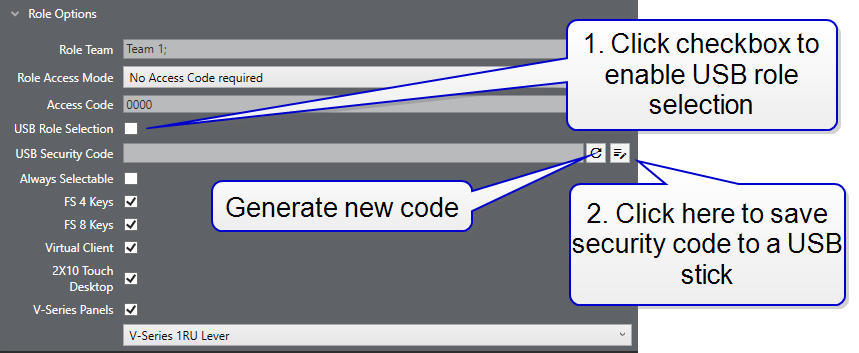
This options is set in EHX > Matrix > Configuration > Roles > [select role] > Role Options:
-
Click the USB Role Selection checkbox to enable this feature. You will see a USB Security Code.
-
Click the USB icon. This allows you to navigate to the USB drive where you will save the code to a USB stick. Save the code to the root directory.

When you have done this, the USB stick can be inserted into the USB drive on the front of a panel to start an intercom session for this role.
| Note: | If you generate a new code, the USB stick used to start the session must contain the new code. |
| Note: | Configuration changes must be applied to the matrix to become live. |
| Note: | The USB must be windows compatible, for example, FAT32, NTFS. |
| Note: | This feature is only available for IrisX panels that have been enabled for use with roles. |
| Note: | USB login cannot be used with an access code for role security. The USB must be kept securely. |